
-
 Fraud Mitigation & Data Integrity
Essential tools for trust, integrity, fraud prevention & regulatory compliance.
-
 Routing Optimization
Gain access to authoritative routing data to create the ultimate routing intelligence for your traffic.
-
 Number Administration
Empowering connectivity as the FCC appointed administrators for critical numbering registries.
-
 Connected Device Intelligence
Gain total transparency to your IoT assets’ current state and vulnerabilities.
What's Happening
Learn about the latest news and updates from Somos.
EVENT
Registration for the 2026 Somos Summit is Officially Open!
Join us Nov. 2-3 in Washington, D.C., as global thought leaders, fraud prevention experts and innovators from across telecom and beyond come together for two days of insights, innovation and conversations on how “Restoring Trust Starts with Us”.
INSIGHT
Restoring Trust in the World’s Communications
Gina Perini shares a bold vision for the future: restoring trust in the world’s communications and reestablishing the phone number as a trusted form of identity.
Insights
TFNRegistry Migration: Preparing API Users for a Smooth Transition
As part of the upcoming TFNRegistry migration to Somos Hub, we’re introducing a more streamlined and secure way to access and manage your services. This transition is designed to simplify authentication, improve consistency across tools and create a more efficient experience for your team.
For API users, API functionality will not change with migration, however there is action that will need to be taken, and planning now will prevent disruptions later.
Here’s what to focus on:
- Start using an API Key
If you’re not already using an API Key, now is the time to make the switch. This will be the most seamless way to authenticate moving forward.
- Updates to Authentication:
If you’re currently using a TFNRegistry login ID and password, your authentication method will need to be updated as part of the migration.
- Set up your Somos Hub Account:
All API users will need access to Somos Hub to support authentication and ongoing management.
Note: If you continue to use the TFNRegistry login ID and password after migration, you must update your API to use your Somos Hub login password once you've set up your account
We encourage all TFNRegistry API users to join us for TFNRegistry Migration: Steps to Achieve API Readiness on May 13 from 2:00-2:30 PM ET for a more in-depth look at the changes ahead and what you need to do to prepare for a successful migration.
Our goal is to help you prepare early so you can adopt these updates smoothly and stay successful through the migration.
2026-2027 Migration Timeline
Somos has outlined a phased migration timeline designed to give Resp Orgs time to prepare, test and migrate to Somos Hub without disruption.
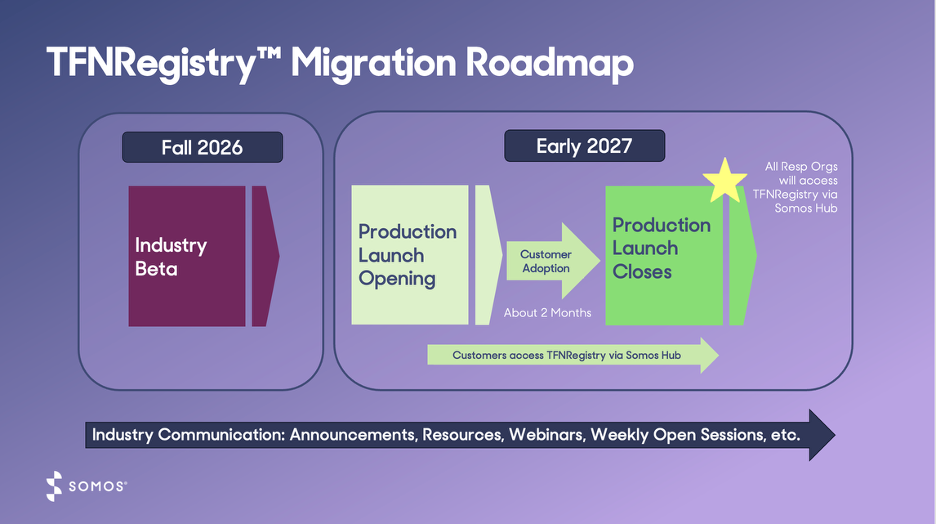
- Q3 2026: Industry Beta program begins
- Participants will create a Somos Hub account and access the TFNRegistry through the Somos Hub
- Participants will create a Somos Hub account and access the TFNRegistry through the Somos Hub
- Q1 2027: Production launch starts
- All Resp Orgs will access the TFNRegistry through the Somos Hub after production launch closes
How to Stay in the Know
-
Additional Beta details will be shared closer to launch – stay tuned
-
Be sure to register for upcoming webinars! Visit somos.com/events for more info
-
Throughout the migration journey, Somos will keep you informed with timely insights, necessary actions and guidance to help you every step of the way
Have additional questions about the redesigned TFNRegistry or the migration to the Somos Hub? Contact the Somos Help Desk at 844.HEY.SOMOS, Option 1.
Stay Connected
Stay in touch! Sign up for our monthly newsletter.
Need to reach us sooner? Call, text, or email us at:
844.HEY.SOMOS help@somos.com
