
-
 Fraud Mitigation & Data Integrity
Essential tools for trust, integrity, fraud prevention & regulatory compliance.
-
 Routing Optimization
Gain access to authoritative routing data to create the ultimate routing intelligence for your traffic.
-
 Number Administration
Empowering connectivity as the FCC appointed administrators for critical numbering registries.
-
 Connected Device Intelligence
Gain total transparency to your IoT assets’ current state and vulnerabilities.
What's Happening
Learn about the latest news and updates from Somos.
EVENT
Registration for the 2026 Somos Summit is Officially Open!
Join us Nov. 2-3 in Washington, D.C., as global thought leaders, fraud prevention experts and innovators from across telecom and beyond come together for two days of insights, innovation and conversations on how “Restoring Trust Starts with Us”.
INSIGHT
Restoring Trust in the World’s Communications
Gina Perini shares a bold vision for the future: restoring trust in the world’s communications and reestablishing the phone number as a trusted form of identity.
Insights
Secure and Simplify TFNRegistry Access with the Somos Hub
Managing access to TFNRegistry and other Somos tools hasn’t always been as simple as it should be — multiple logins, different URLs and added steps that slow down your day. The Somos Hub is designed to change that! As introduced in the recent webinar, 2026 TFNRegistry™ Roadmap: Navigating the Next Wave of Innovation, the Somos Hub brings TFNRegistry, Secure Portal functionality and other Somos products together in one place. With a simplified email-based login, you can easily access all your Somos solutions via the Somos Hub with a single sign-in instead of navigating multiple URLs and managing multiple passwords. This makes access more consistent, more secure and easier to manage across your day-to-day work.
In a recent webinar, led by the TFNRegistry Product Team, it was explained that you must have an individual email address that is unique to you, and not a shared group or department inbox. This is an important change for TFNRegistry users, as access to the Somos Hub will now be associated to individual email addresses. For example:
-
name@company.com is an individual email
-
tollfree@company.net is not and individual email
Note: If Resp Orgs have a business case that doesn’t allow for this, we encourage you to reach out to the Somos Help Desk so Somos may better understand and work with you on a solution.
Having accurate email addresses and company information updated in Secure Portal is essential for a smooth transition to the Somos Hub. Resp Orgs are encouraged to complete the following action
- Review and update the email address tied to your current login IDs in Secure Portal. Your Somos Hub account will use the email address on record
- If you are a primary contact or company admin, confirm user email addresses are individual, up to date addresses
- Somos will automatically migrate the information you have on file in Secure Portal to the Somos Hub
As we move toward migration, the Somos Hub is designed to make the experience simpler and more consistent from the start: one place to access Somos Solutions.
2026-2027 Migration Timeline
Somos has outlined a phased migration timeline designed to give Resp Orgs time to prepare, test and migrate to Somos Hub without disruption.
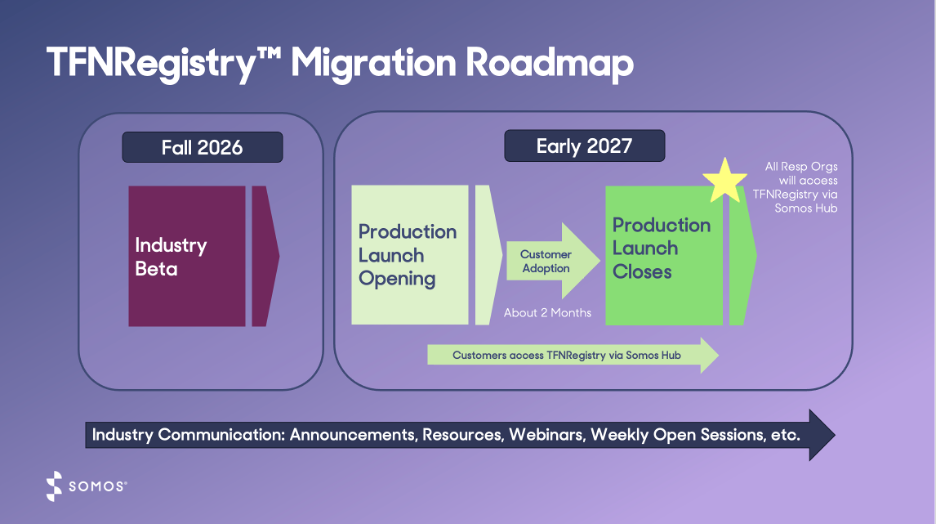
- Q3 2026: Industry Beta program begins
- Participants will create a Somos Hub account and access the TFNRegistry through the Somos Hub
- Q1 2027: Production launch starts
-
All Resp Orgs will access the TFNRegistry through the Somos Hub after production launch closes
-
How to Stay in the Know
-
Additional Beta details will be shared closer to launch – stay tuned
-
Be sure to register for our TFNRegistry Migration API Readiness webinar to learn more about upcoming actions for API users
-
Throughout the migration journey, Somos will keep you informed with timely insights, necessary actions and guidance to help you every step of the way
Stay tuned for the final blog in this event recap series!
Have additional questions about the redesigned TFNRegistry or the migration to the Somos Hub Contact the Somos Help Desk at 844.HEY.SOMOS, Option 1.
Stay Connected
Stay in touch! Sign up for our monthly newsletter.
Need to reach us sooner? Call, text, or email us at:
844.HEY.SOMOS help@somos.com
